
About the Game
Interstellar Click Patrol (aka 'UFO Spotter') is a fast-paced reflex game where you must eliminate hostile UFOs while avoiding decoys. As levels increase, UFOs move faster, spawn in greater numbers, and introduce special behaviors.
Download
Download the latest version of Interstellar Click Patrol for Windows.
Download Game
Note: Extract the ZIP and run the executable to start playing.
How to Play
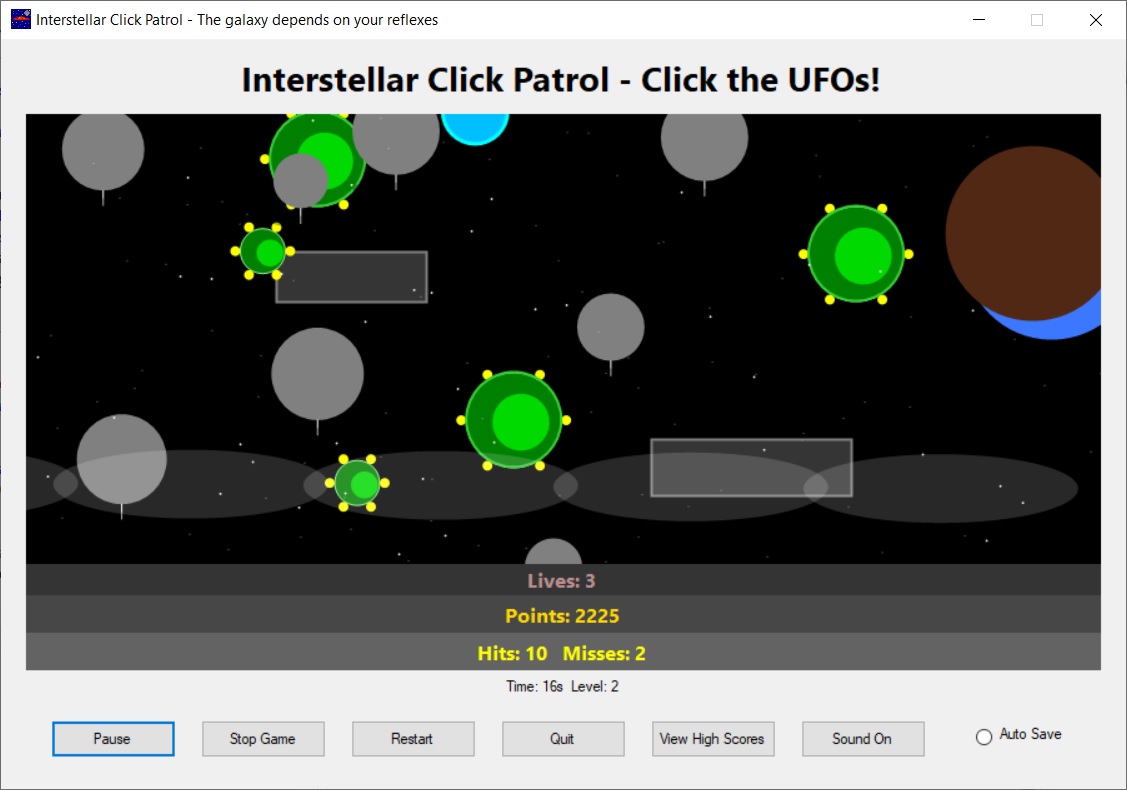
- Click green UFOs to destroy them and earn points.
- Gray objects are decoys — clicking them causes misses.
- Missing objects or misclicking costs lives.
- The game progresses automatically through levels.
- The game ends when you run out of lives or stop the game.
Controls
- Mouse Click – Shoot UFOs / activate power-ups
- Pause Button – Pause or resume gameplay
- Restart – Start a new game
- Stop Game – End the current session
- Sound On/Off – Toggle audio effects
UFO Types
- Small Fast UFO – Very fast, low health, hard to hit
- Medium UFO – Balanced speed and durability
- Large Slow UFO – Slow but requires multiple hits
Special Power-Ups
- Blue Orb – Slow Time: Slows all UFO movement temporarily
- Blue Orb – Bonus Points: Instantly awards bonus points
- Blue Orb – Freeze UFOs: Temporarily freezes all enemies
Scoring & Bonuses
- Destroying UFOs awards base points
- Quick reactions give fast-click bonuses
- Small or fast UFOs grant extra points
- Hit streaks multiply your score
- Achievements unlock visual rewards
Saving & High Scores
- Enable Auto Save to store your progress
- High scores are saved locally on your computer
- Scores are ranked automatically by points
ScreenShot
System Requirements
- Windows 10 or newer
- .NET Framework (or .NET Desktop Runtime)
- Mouse